


Have you ever been knocked off your feet? If you do not have a firm grasp of the different of option order types, it may happen sooner than you think.
Traders who migrate to options trading from the world of stock trading often find it very difficult to grasp the nuanced differences between the order types available to options traders.
With stocks, you can only do one of two things: buy or sell. Options have multiple order types to choose from.
Once you have an understanding of the options order types, you will be much better prepared to implement safe and effective trading strategies.
Positions are Either Opened or Closed
When you place an options order, you can either open or close a position. Since options orders are more complex than stock orders, you need to look carefully at what the end of your order is referring to - is it "to open" or "to close"?
Understanding your intended position will help prevent accidental orders.
Open positions are when an investor is taking a long or short investment and actively buying or selling a security to establish his position.
Closing positions removes any stake or liability that the investor has in a security. When an investor closes a position, he or she is no longer actively invested in that security.
4 Types of Option Orders
Buy-to-Open (BTO)
Buying-to-Open establishes an option position when the investor buys either a Long Call or Long Put.
New options traders who have a background in trading stocks will most likely be comfortable with the Buy-to-Open order because the rationale behind it is a lot like buying shares of stock.
When you buy shares of stock, you want to profit off of an increasing stock price. Likewise, when you buy an options contract, you want the price of the option to appreciate.
Whether the investor is bullish or bearish on the underlying asset, he or she believes that the price of the option will appreciate, and is bullish on that particular contract.
Buying-to-open can also allow a trader to build a spread or hedge another open position.
For example, the trader may not need the option to be immensely profitable to achieve her goal. Let's say that she owns 2,000 shares of ABC company, and she wants to mitigate any downside risk that may arise from poor quarterly earnings.
She may elect to buy out-of-the-money (OTM) put options on ABC that will offset a steep decline in the stock price. If the stock price falls far enough past the strike price, the put option will become in-the-money (ITM), and she may be able to sell the option and close her position with enough of a profit to make up for her stock losses.
Sell-to-Open (STO)
Selling-to-Open indicates that the investor is bearish on the value of the option. The investor most likely believes that the premium received when writing the option will be worth more than the option at its expiration.
When a trader initiates an STO trade, the broker matches them with a trader who is buying-to-open a long position. Once you submit the sell-to-open order, you receive a credit to your account, which is the buyer's premium.
If you write a naked contract (i.e., you do not own the shares that the contract you sold represents), then you could be exposed to a potentially enormous loss if the share price skyrockets unexpectedly. In such a situation, you would be responsible for buying the shares at the market price to provide to the buyer of the contract.
Owning the shares and then writing the option would be called a "covered" option because you own the shares in case the buyer decides to exercise the option.
Buy-to-Close (BTC)
Buying-to-Close allows the investor to exit a short position in which they sold an option contract.
If a trader wrote an option contract utilizing an STO order and wants to close out of the position, he or she can either wait for the option to expire, or buy the same option contract close out the position.
Since the trader was in a net short position, the underlying assumption was that the stock would decrease in value, and the option that they sold would expire worthless. When the option expired, the trader would have the entire premium paid by the buyer as profit.
If the stock performs adversely to the trader's strategy, buying-to-close would prevent a dazzling loss if the option they sold was naked.
Sell-to-Close (STC)
Selling-to-Close ends a long option position, and is relatively analogous to selling shares of stock to close out a long investment position.
On the other hand, options are very different than stocks because they expire on a specific date. Due to their finite lifespans, traders only have a few choices when they buy an options contract:
- If the contract ends in-the-money, the trader can exercise his right to take ownership of the underlying shares.
- It can expire worthless, and the trader loses the entire premium paid.
- Finally, the contract can be sold to close out the position, either at a profit or a loss.
By selling to close the position, the trader no longer has any stake in that option—some reasons to sell to close before the expiration could include taking profit or cutting a loss. The trader may also be avoiding exercising the contract because ownership of the underlying shares is not desired.
Combining Different Orders
Traders who understand the orders can combine them into different strategies to form more nuanced trades.
Bear Put Spread
If the investor is bearish about an underlying stock, a bear put spread can be used to profit off the decline with limited losses.
The investor simultaneously buys a put at a higher strike price and sells a put at a lower strike price, with both options having the same expiration date. Selling the put at the lower strike price offsets some of the premium paid for the long put.

Long Straddle
A long straddle can be deployed if the trader believes that the stock price will move significantly in the future, but is unsure of the direction.
For example, a pharmaceutical company is expected to release a report on a clinical trial. If the trial went well, the stock might skyrocket, and if it went poorly, it might tank.
The investor would buy a call and a put on the stock at the same strike price and the same expiration date.
Long straddles have the potential for unlimited gains, and the maximum loss is the premiums paid for the options contracts.
.png)
Iron Condor
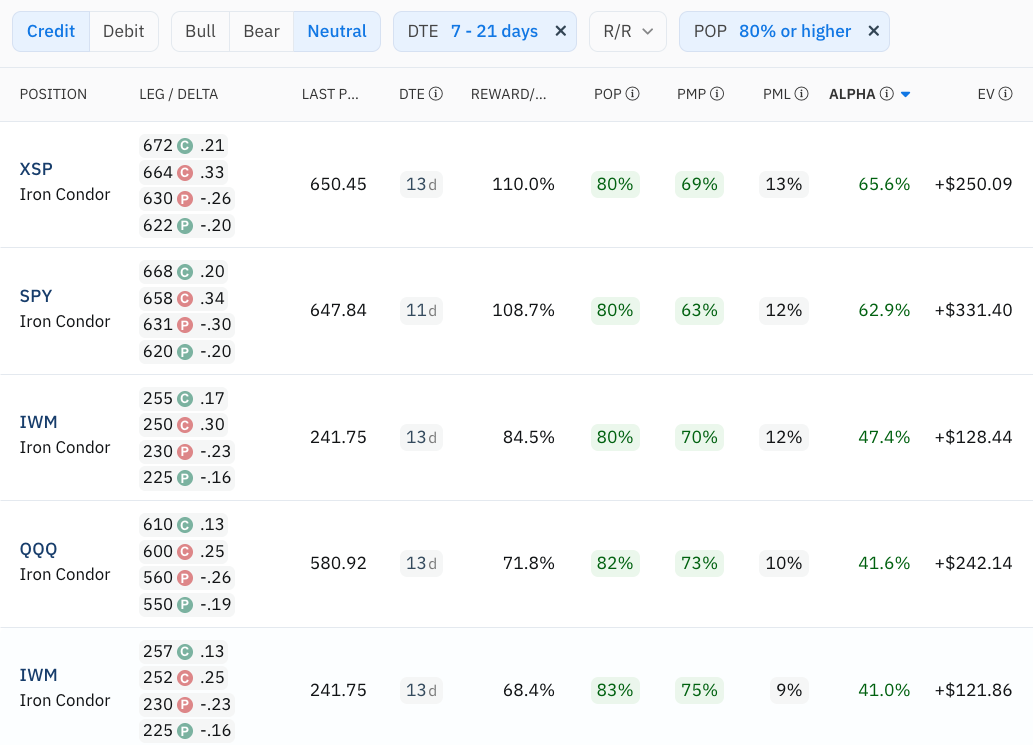
An iron condor allows traders to capitalize on low volatility by combing a bear call spread and a bull put spread.
To create an iron condor, the trader would sell an OTM put and buy an OTM put at a lower strike price, which would form a bull put spread.
Then, the trader would sell an OTM call and buy an OTM call at a higher strike price, creating the bear call spread.
All of the options would have the same expiration date, and creates a net premium for the trader. As long as the stock price does not move above or below the short options, the trader will generate a profit.
If the stock moves unexpectedly, the long options will mitigate the maximum loss on the iron condor.

Market Orders and Limit Orders
There are two primary order types to enter trades: Market Orders and Limit Orders.
Market orders are placed and filled almost instantaneously. They are useful if you are looking to open or close a position quickly, but you may get stuck with a bad price.
When you place a buy or a sell market order, you are telling the broker to fill the order at whatever price the market offers. With high volume/low-spread securities, the price you see is usually the price you get. Market orders are beneficial if you need to fill an order quickly.
An example of a time that you may not want to use a market order is if there is a low trading volume, and you are trying to fill a large order. If you submit a large market order with low volume, the bid-ask spread on the security may change drastically, and you can find yourself stuck with a terrible price.
Limit orders ensure that you get in or out of a position at a specific price.
For example, imagine you are trying to open a long call position with XYZ Company's August 21 options. You think that the fair price for the call is $2.50, but they are currently trading at $2.90. You could place a limit order at $2.50 so that if the option falls to $2.50 or below, the order will be filled.
The limit order can be set to cancel after a specific time, or you can cancel it manually.
Conversely, you can set a limit sell order that operates in the same way. If you want to exit a position by selling an option, you can set the limit sell price to the minimum you are willing to accept for the option.
It is important to note that while limit orders guarantee the price or an order, they are not guaranteed to be filled.
As you can see, there is a great deal of complexity with options orders. By taking the time to learn how each order works, and how they work together, novice and expert traders alike can make better investment decisions and implement more effective strategies.
.png)






'%3e%3cg id='Final-Copy-2_2_' transform='translate(1275.000000, 200.000000)'%3e%3cpath class='st0' d='M7.4,12.8h6.8l3.1-11.6H7.4C4.2,1.2,1.6,3.8,1.6,7S4.2,12.8,7.4,12.8z'/%3e%3c/g%3e%3c/g%3e%3c/g%3e%3cg id='final---dec.11-2020'%3e%3cg id='_x30_208-our-toggle' transform='translate(-1275.000000, -200.000000)'%3e%3cg id='Final-Copy-2' transform='translate(1275.000000, 200.000000)'%3e%3cpath class='st1' d='M22.6,0H7.4c-3.9,0-7,3.1-7,7s3.1,7,7,7h15.2c3.9,0,7-3.1,7-7S26.4,0,22.6,0z M1.6,7c0-3.2,2.6-5.8,5.8-5.8 h9.9l-3.1,11.6H7.4C4.2,12.8,1.6,10.2,1.6,7z'/%3e%3cpath id='x' class='st2' d='M24.6,4c0.2,0.2,0.2,0.6,0,0.8l0,0L22.5,7l2.2,2.2c0.2,0.2,0.2,0.6,0,0.8c-0.2,0.2-0.6,0.2-0.8,0 l0,0l-2.2-2.2L19.5,10c-0.2,0.2-0.6,0.2-0.8,0c-0.2-0.2-0.2-0.6,0-0.8l0,0L20.8,7l-2.2-2.2c-0.2-0.2-0.2-0.6,0-0.8 c0.2-0.2,0.6-0.2,0.8,0l0,0l2.2,2.2L23.8,4C24,3.8,24.4,3.8,24.6,4z'/%3e%3cpath id='y' class='st3' d='M12.7,4.1c0.2,0.2,0.3,0.6,0.1,0.8l0,0L8.6,9.8C8.5,9.9,8.4,10,8.3,10c-0.2,0.1-0.5,0.1-0.7-0.1l0,0 L5.4,7.7c-0.2-0.2-0.2-0.6,0-0.8c0.2-0.2,0.6-0.2,0.8,0l0,0L8,8.6l3.8-4.5C12,3.9,12.4,3.9,12.7,4.1z'/%3e%3c/g%3e%3c/g%3e%3c/g%3e%3c/g%3e%3c/svg%3e) Your Privacy Choices
Your Privacy Choices